Short answer: WhisprIQ is a Windows desktop AI sales call assistant for phone agents. It shows on-screen suggestions during the call and a post-call summary when you end it. It never speaks to the customer, never joins as a bot, and never sends messages on its own. Mac is waitlist — join from /download. Softphone or computer dialer on the PC works best; cellphone-on-speaker is a poor fit.
If you searched for a “Windows AI sales assistant” because meeting overlays only run well on Mac — this page sets expectations before you trial.
Product hubs: AI sales call assistant · Real-time AI sales assistant
Why Windows desktop (not another meeting overlay)
Most “AI sales assistants” in search results are built around Zoom, Meet, or Teams. Phone agents who buy leads and dial them need something different: coaching that sits on the same Windows PC as the softphone, with a private panel the prospect never sees.
WhisprIQ is aimed at that workflow — life and final expense, Medicare, ACA, auto/home, mortgage, debt relief, and related verticals — not at replacing your dialer or speaking for you.
Name collision note: WhisprIQ (whispriq.com) is not WhisperIQ.dev, not Wispr Flow, not Whispr, and not Whisper transcription. Details: WhisprIQ vs WhisperIQ, Wispr Flow, and Whisper.
What you get on Windows
During a softphone / computer-dialer call:
- Live suggestions on your screen (often labeled moment / strategy / action)
- Pause anytime — private control
- Use, adapt, or ignore each suggestion — you still speak
- Post-call summary when you end the call
WhisprIQ does not: make the call compliant; decide product suitability; guarantee approvals; auto-email or auto-text anyone.
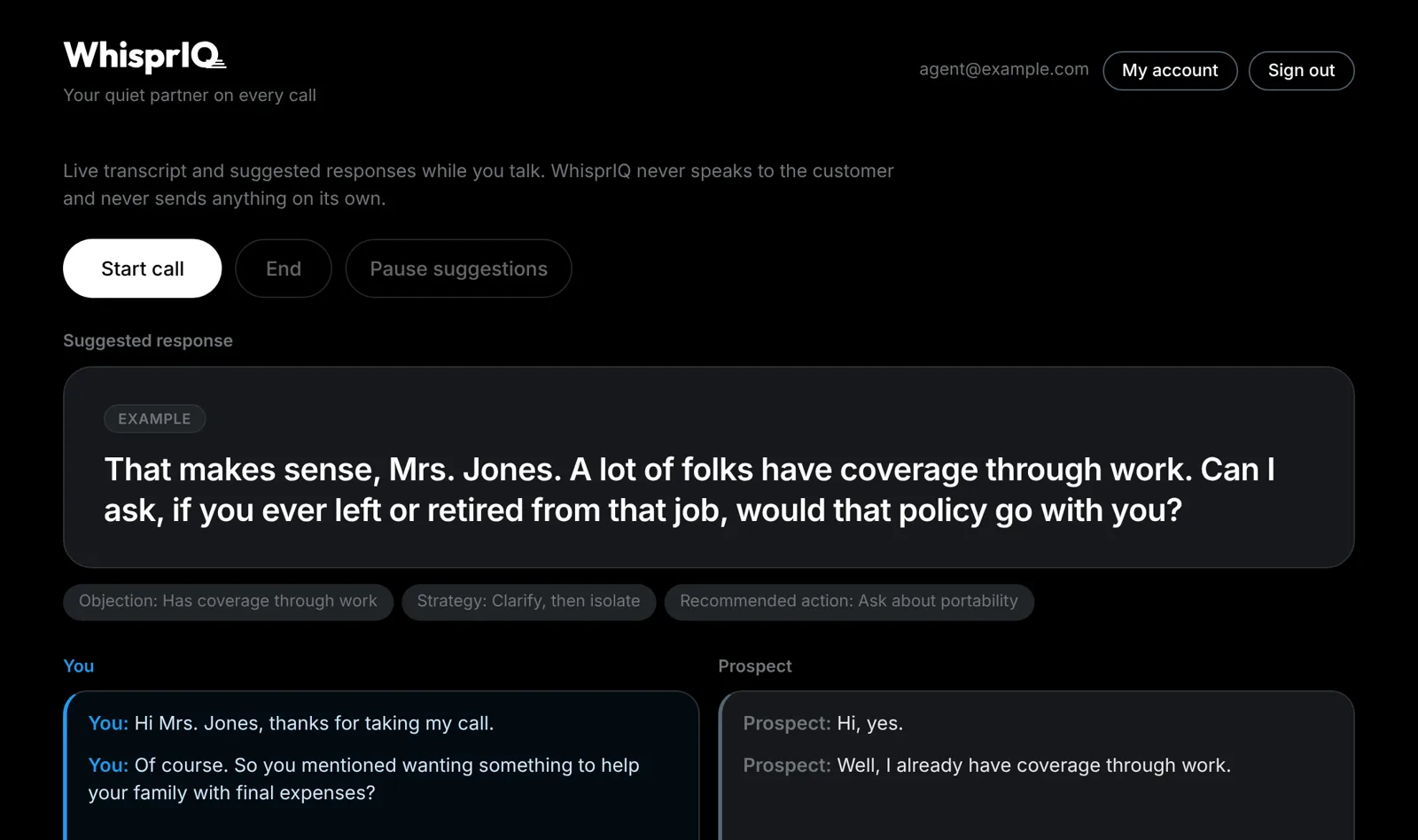
WhisprIQ Windows desktop UI from the marketing library. Suggestions appear on the agent’s screen only. Role-play / product demo imagery — not a live customer outcome. No close-rate or income claims.
Softphone first (setup truth)
Real-time coaching needs call audio on the machine where the assistant runs.
Recommended
- Windows PC with WhisprIQ installed
- Softphone or computer dialer on that same PC
- Headset on the PC
- Suggestion panel on a monitor the prospect never sees
Poor fit
- Cellphone on speaker next to the laptop
- Desk phone only, with no call audio on the PC
Deep dive: Softphone vs cellphone for an AI sales call assistant
We run alongside dialers your company already approved. This article does not claim named official dialer integrations — “works alongside” is not “certified plug-in.”
Mac waitlist (honest)
Mac users: WhisprIQ is not generally available on macOS today. Join the waitlist on /download. Do not buy a trial expecting a Mac installer to appear at signup. When Mac ships, we will update download and this page.
If you only have a Mac today and must dial now, keep using your current process — or use a company Windows machine if your employer provides one and allows the tool.
Trial and pricing (match live site)
- Trial → /signup
- Plans → /pricing
- Trial terms on the live pricing card: card required; not charged until your 2 free hours are used (or 14 days); cancel anytime
- Plans listed on pricing: Starter / Pro / Power / Teams
We are not promising higher close rates, income, or revenue — only optional on-screen coaching for moments agents already practice in training.
Trust companions before you dial live leads
- Can the customer hear the AI on my sales call? — no; suggestions are agent-side
- Is it legal to use AI on sales calls? — educational consent basics; not legal advice
- Do you need to record calls to use an AI sales assistant? — live assist ≠ saved WAV; you still own consent
- Privacy Policy — what is stored (audio not stored; summaries retained per policy)
WhisprIQ does not make calls compliant. Follow carrier, agency, FMO, and state rules. Use company-approved scripts.
Soft next step
Windows agents with company clearance:
- Read /pricing
- Start trial at /signup
- Install from /download
- Practice on a role-play softphone call before live leads
Disclaimer
Educational product guide — not legal or compliance advice. WhisprIQ does not make calls compliant. You own disclosure, consent, suitability, and what you say. Screenshots are product / role-play imagery, not customer results.