Short answer: Treat “send me something” and “call me back later” as stalls, not automatic ends. Acknowledge, isolate whether it’s a real open question or a polite exit, then either take a short next step on this call or lock a specific callback (day + time). WhisprIQ can suggest a next line on your screen; it never auto-sends email or texts, never speaks to the customer, and does not make the call compliant.
This is training language, not an approved script. Follow your company rules. Related product hubs: Real-time AI sales assistant, AI sales call assistant, Final expense AI sales assistant, Debt relief AI sales assistant.
Why these stalls dominate outbound phone sales
Public outbound-objection taxonomies (including competitor framing such as Balto’s Jul 10, 2026 objection post) consistently put timing / “not now” / send-me-info language near the top of what ends calls. Agents freeze because:
- Saying “sure, I’ll email you” feels polite — and often means the lead goes cold.
- Pushing through every stall feels rude.
- “Call me next week” without a calendar hold is where follow-ups disappear.
Your job is not to win every stall. It is to find out what the stall is, offer one clean advance, and leave a concrete next step when they truly need time.
What the stall usually means
- Real information gap — they want a quote, summary, or comparison in writing.
- Timing — bad moment (kids, work, driving).
- Polite exit — soft “no” without conflict.
- Missing decision-maker — spouse / partner not on the line (see spouse stall).
- Fear / trust — something felt unclear and they want space.
Isolate with one short question before you pick a rebuttal.
Framework: acknowledge → isolate → advance or schedule
1) Acknowledge
Illustrative:
“Happy to send a short summary — before I do, what’s the main thing you want to see in writing?”
Or for callback:
“Totally fair if now’s a bad time. Before we hang up, what’s the best day and time for a quick follow-up?”
2) Isolate real objection vs polite exit
Illustrative:
“Is it mainly that you want the numbers in writing, or that you’re not sure this is a fit yet?”
Or:
“When you say call you back — is there something specific you want to check first, or is next week just clearer on your calendar?”
Use the answer:
- Wants writing + still engaged → confirm what you’ll send manually (WhisprIQ does not send it), then ask for one on-call clarification so the email is useful.
- Bad timing → dated callback.
- Not a fit / soft no → respectful exit; one optional callback offer max.
- Unsure on a real objection → switch to that objection (price, coverage, credit, spouse) instead of pretending email will fix it.
3) Short next step on this call (when appropriate)
Illustrative:
“Before I email anything, can I ask two quick questions so what I send actually matches what you need — then if it still makes sense we can start the application and see if we can get you approved?”
Rules:
- Assumptive next step only when they are still in the conversation.
- No payment dates invented for urgency.
- Never claim WhisprIQ emailed the prospect — you send what your process allows.
4) Book a concrete callback (when they need time)
Bad: “Okay, I’ll try you next week.”
Better (illustrative):
“Let’s put 10 minutes on Tuesday at 6:30 p.m. your time — does that work, or is Wednesday better?”
Lock day + time + number. Vague callbacks are polite fiction.
Example (illustrative)
Prospect: “Just email me the info and I’ll look it over.”
Agent: “Happy to. What’s the one thing you most want to see in that email — the monthly amount, what’s covered, or how it compares to what you have?”
Prospect: “Mostly the monthly.”
Agent: “Got it. Quick check so I send the right range — based on what you shared, does looking at a lower option make sense if the first number felt high? Then I’ll send the short summary and we can pick a time to review it together.”
If they disengage: schedule or exit. Do not read five more rebuttals.
Where WhisprIQ helps
On a Windows softphone call, WhisprIQ may label:
- Moment: Send-info / callback stall
- Strategy: Acknowledge → isolate → advance on-call or book dated callback
- Action: Illustrative line (you adapt)
Role-play example (demo UI — not a live customer call):
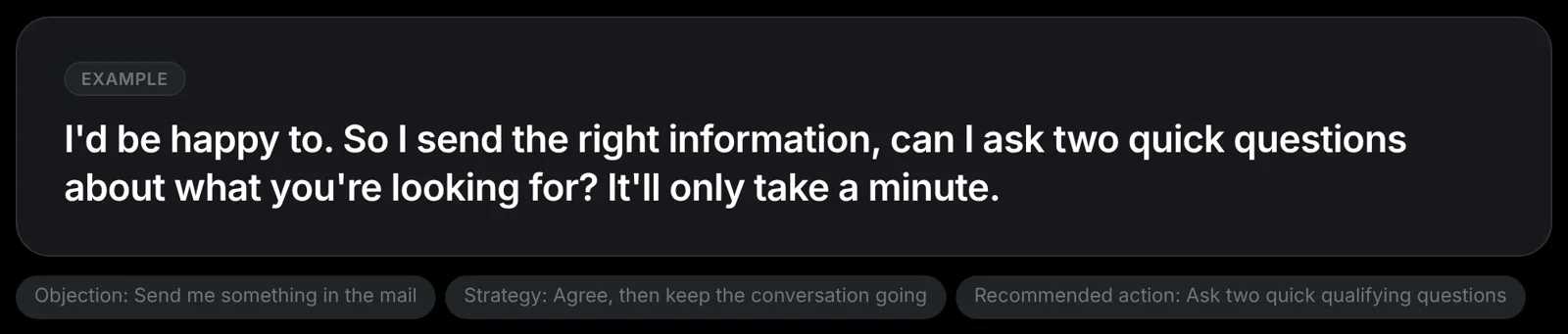
Demo / role-play screenshot from WhisprIQ’s existing marketing library. WhisprIQ never auto-sends email. Illustrative only.
WhisprIQ does not: speak to the customer; join as a bot; auto-send email/SMS; make calls compliant. Pause anytime. Use, adapt, or ignore.
Softphone truth: best with computer dialer / softphone on Windows. Cellphone-on-speaker is a poor fit. Details: Softphone vs cellphone.
Soft next step
Live pricing (checked 2026-10-26 PT — re-check on publish): Trial $0; card required; not charged until 2 free hours are used (or 14 days); cancel anytime. Starter $49/mo (20h). Pro $99/mo or $948/yr (50h). Power $199/mo (120h). Teams from $89/agent/mo (5+, 50h each).
No close-rate, income, or revenue promises.
Disclaimer
Educational only — not legal, compliance, or product advice. Illustrative scripts. You own disclosures, consent, suitability, and outreach rules (including what you may email). WhisprIQ does not make calls compliant. Role-play demos ≠ customer results.
Suggested internal links
- /real-time-ai-sales-assistant
- /final-expense-ai-sales-assistant · /debt-relief-ai-sales-assistant
- /blog/need-to-talk-to-spouse-objection-insurance
- /blog/softphone-vs-cellphone-ai-sales-assistant
- /pricing · /signup · /download
- /whispriq-vs-whisperiq-wispr-flow
- Strip until live: can’t-afford FE post · already-have-coverage · Balto alternatives if not live
Footer one-liner (disambiguation — required)
WhisprIQ (whispriq.com) is a Windows app for real-time phone-sales suggestions. It is not WhisperIQ.dev, Wispr Flow, Whispr, or Whisper transcription.
Word count (body)
Approx. 1,350–1,500 words depending on CMS markup.