Short answer: Do not argue the budget. Acknowledge the concern, isolate whether it’s the premium size or “not a priority right now,” then offer a smaller option or a clear benefit reframe — only with company-approved wording. When they are ready for a next step, use an assumptive advance such as starting the application to see if they can get approved — never invent a payment date to manufacture urgency.
This post is training language, not a carrier-, agency-, or FMO-approved script. Product recommendations, suitability, and disclosures stay yours. WhisprIQ can surface on-screen suggestions during a softphone call; it never speaks to the customer and does not make the call compliant.
Related hubs: Final expense AI sales assistant, Final expense objection handling, AI sales call assistant.
Why affordability freezes new FE agents
Public FE rebuttal libraries (e.g. FEXmagnet- and B3 Voice–style posts indexed in late 2026) already publish “can’t afford it” scripts. New agents still freeze because they hear:
- “I’m being pushy if I keep going.”
- “If I drop the premium I’m ‘discounting’ without permission.”
- “If I agree with them, the call is over.”
None of those have to be true. Sometimes the quote is simply too high for the household. Sometimes “can’t afford it” means “I’m not convinced this matters more than what I’m already paying.” Your job is to listen, isolate, and leave a concrete next step — not a debate about their bank account.
WhisprIQ is built for the mid-call freeze: a moment → strategy → action suggestion on your Windows screen only. Softphone / computer-dialer audio works best — see Softphone vs cellphone.
What “I can’t afford it” usually means
Isolate before you rebut:
- True premium stretch — the monthly amount is higher than they will (or can) pay.
- Priority / value — they could pay something similar but don’t yet see why this belongs in the budget.
- Polite exit — they want off the phone without saying “no.”
- Missing decision-maker — spouse / partner controls the budget (see spouse stall guide).
You cannot tell which one from the first sentence. So do not argue. Do not shame them. Do not invent a fake “rate lock by Friday” payment date.
Framework: acknowledge → isolate → option or reframe → advance
Swap in only language your company allows.
1) Acknowledge (protect dignity)
Illustrative:
“I hear you — the monthly amount matters. Let’s make sure we’re looking at something that actually fits.”
Or:
“Fair enough. Nobody wants a policy that squeezes the grocery budget.”
Goal: lower defenses so you can ask one clarifying question.
2) Isolate premium size vs priority
Illustrative:
“When you say you can’t afford it — is it mainly the monthly amount itself, or that you’re not sure this should be a priority right now?”
How to use the answer:
- Amount → move to a smaller face amount / lower premium option your company allows you to quote.
- Priority → benefit reframe (who is left with the bill; what they said they wanted to protect) — still illustrative only.
- Polite exit → one respectful clarification, then a clean goodbye or dated callback. Do not stack five rebuttals.
- Spouse / budget jointly → invite or schedule the partner; do not bully past a joint decision.
3) Smaller option (when it is about the number)
Illustrative (never invent products your shop does not sell):
“Would it help if we looked at a lower face amount so the monthly is closer to what you’re comfortable with — and we can always review increasing it later if your company process allows?”
Rules:
- Stay inside approved plan options and illustration rules.
- Do not promise underwriting outcomes or “you’ll definitely qualify.”
- Do not invent payment dates.
4) Benefit reframe (when it is about priority)
Illustrative:
“Totally fair. Based on what you shared about wanting to keep [funeral / final expenses / family] off your kids’ plate — is the concern the number, or that you’re not sure this solves that yet?”
Then connect their words to the need. Do not lecture. Do not bash other carriers or “burial plans” they already have — curiosity first (companion post when drafted: already-have-coverage).
5) Advance without payment-date language
When they are ready for a next step, Barry’s preferred illustrative close style for WhisprIQ demos and suggestions:
“Let’s start the application and see if we can get you approved. Once you’re approved, you can look it over and make any changes if necessary.”
Rules:
- Assumptive next step — not “would you maybe want to think about an application sometime?”
- No payment date invented for urgency
- Approval language stays conditional
- If they are clearly not ready: book a specific callback or exit cleanly
Example call flow (illustrative only)
Prospect: “I can’t afford that.”
Agent (acknowledge): “I hear you — the monthly amount matters.”
Agent (isolate): “Is it mainly the number itself, or that you’re not sure this should be a priority right now?”
Prospect: “It’s just more than I wanted to spend.”
Agent (option): “Got it. Let’s look at a lower face amount so the monthly is closer to what you’re comfortable with — does that make sense to review?”
If they engage: Quote only what you are allowed to quote. When ready: use your approved advance (e.g. the application-start line above).
If they want off: “Understood. If it helps later, I’m here — would Tuesday at 5:00 your time work for a quick follow-up, or would you rather leave it for now?”
Where WhisprIQ helps (and where it does not)
On a Windows softphone call, when the prospect says they can’t afford it, WhisprIQ can surface something like:
- Moment: Affordability / budget objection
- Strategy: Acknowledge → isolate premium vs priority → smaller option or reframe
- Action: Illustrative next line (you adapt)
Role-play example (demo UI — not a live customer call):
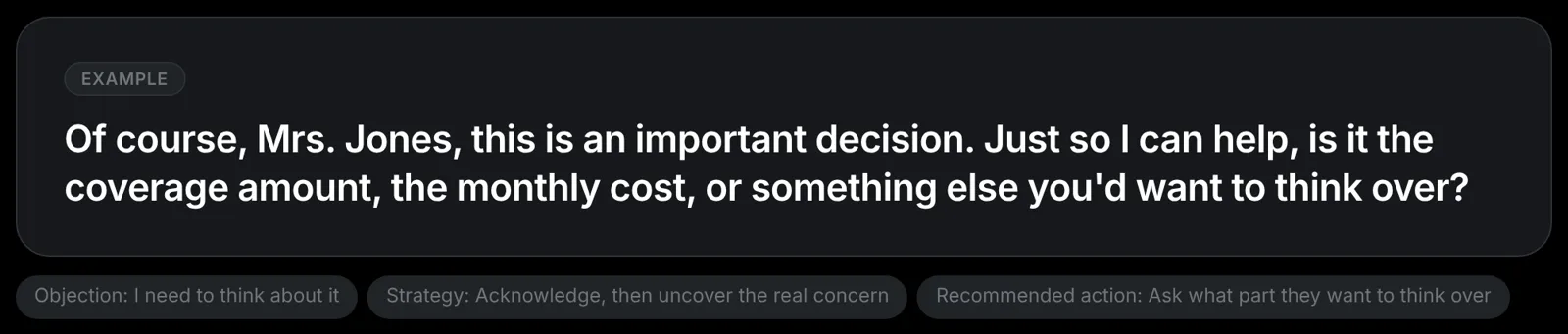
Demo / role-play screenshot from WhisprIQ’s existing marketing library. Illustrative suggestion wording; follow your company’s approved scripts. Never invent payment dates. No close-rate or income claims.
What WhisprIQ does not do:
- Speak to the customer
- Join as a bot
- Send quotes or emails on its own
- Decide suitability or face amount for you
- Guarantee approval
- Make the call compliant
You can Pause suggestions anytime. Use, adapt, or ignore each line. Related: Can the customer hear the AI? · Is it legal to use AI on sales calls?.
Softphone note
Works best with a softphone or computer dialer on Windows and a headset. Cellphone-on-speaker next to the laptop is a poor fit. Mac = waitlist on /download.
Soft next step
If your company has cleared AI assist for your role:
Live pricing (checked 2026-10-26, America/Los_Angeles — re-check on publish day): Free trial $0; card required; not charged until your 2 free hours are used (or 14 days); cancel anytime. Starter $49/mo (20 hours). Pro $99/mo or $948/yr (50 hours). Power $199/mo (120 hours). Teams from $89 per agent/month (5+ agents, 50 hours per agent). Every plan: real-time suggestions, all 11 industries, end-of-call summaries.
We are not promising higher close rates, income, or revenue. We are offering optional on-screen coaching for a freeze most FE agents already know — with the customer hearing you, not the AI.
Disclaimer
Educational training content — not legal, compliance, or product advice. Scripts here are illustrative. Follow your carrier, agency, FMO, and state rules. WhisprIQ does not make calls compliant. You own disclosure, consent, suitability, and what you say. Role-play demos are practice only; they are not customer results.
Suggested internal links (wire on publish)
- /final-expense-objection-handling
- /final-expense-ai-sales-assistant
- /ai-sales-call-assistant
- /ai-agent-assist-insurance
- /pricing · /signup · /download
- /whispriq-vs-whisperiq-wispr-flow
- Companions: spouse stall · softphone · legal · customer-hear-AI
- Strip until live: already-have-coverage FE post · send-me-info post
Footer one-liner (disambiguation — required)
WhisprIQ (whispriq.com) is a Windows app for real-time phone-sales suggestions. It is not WhisperIQ.dev, Wispr Flow, Whispr, or Whisper transcription.
Word count (body)
Approx. 1,550–1,700 words depending on CMS markup and screenshot caption.